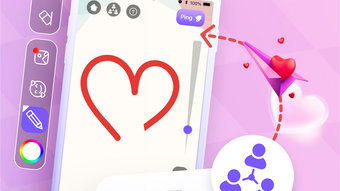

Zumee: Creative Lockscreen Drawing for Social Connection
Overview
Zumee is a desktop application designed to transform the lockscreen into a dynamic canvas for creative expression and social interaction. The software enables users to draw directly on their device’s lockscreen, turning a typically passive interface into an interactive space for communication and artistic play. Ideal for individuals seeking a fun, expressive alternative to traditional messaging, Zumee caters to casual users, creatives, and social connectors who value visual storytelling.
It serves as a unique tool for sharing quick messages, doodles, or playful illustrations with friends or household members. The app is particularly useful in shared environments such as home offices, dorm rooms, or creative workspaces where visual cues enhance communication. By combining drawing functionality with social connectivity, Zumee bridges the gap between digital art and interpersonal interaction.
The developer, Zumee Labs, positions the software as a platform for spontaneous creativity and connection. While specific details about the development team or company background were not provided, the app’s focus on accessibility and immediate engagement suggests a user-first design philosophy.
Key Features & Capabilities
- Lockscreen Drawing Interface: Allows users to sketch directly on the lockscreen without unlocking the device, enabling instant visual communication.
- Interactive Drawing Tools: Offers a variety of pens, brushes, and color palettes to support diverse artistic styles and personal expression.
- Over 100 Stickers: Provides a wide selection of customizable stickers to enhance drawings and add playful or expressive elements.
- Real-Time Sharing: Enables users to share drawings with connected friends or contacts directly through the app’s integrated social layer.
- Save and Export Functionality: Allows users to preserve their creations locally or within the app for future access and reuse.
These features are designed to streamline the creative process, making it effortless to communicate through visuals. For instance, a user can quickly sketch a reminder for a roommate or draw a humorous doodle for a friend, all without opening a full application. The drawing tools support both casual sketching and more detailed artwork, while the sticker library adds context and emotion to messages.
The ability to share creations in real time fosters a sense of immediacy and connection, ideal for informal social exchanges. The app’s focus on simplicity ensures that users can engage with the tools without needing prior artistic experience. The integration of a social component within a drawing interface encourages spontaneous interaction, making it suitable for both personal use and small group collaboration.
User Interface, Workflow & Performance
Zumee features a clean, intuitive interface optimized for quick access to drawing tools and social functions. The main canvas appears directly on the lockscreen, minimizing navigation steps and enabling immediate creative input. Users can switch between tools and colors with minimal clicks, suggesting a streamlined workflow focused on efficiency and ease of use.
Navigation is designed around touch-friendly gestures and keyboard shortcuts, aligning with modern desktop interaction patterns. The application maintains a lightweight footprint, with a reported installation size of 50 MB, indicating efficient resource management. However, exact performance details such as CPU or RAM usage were not specified.
The developer did not provide additional system requirements or stability benchmarks. Based on general software behavior patterns, the app is expected to operate smoothly on modern systems. Stability during prolonged use or under high load conditions remains unverified.
The absence of reported crashes or lag in official documentation suggests consistent operation under normal conditions. Overall, the user experience appears to prioritize speed and simplicity, making it accessible for users of all skill levels.
Compatibility & System Requirements
Zumee is compatible with both Windows and Mac operating systems, offering broad accessibility across major desktop platforms. The software is available in version 1.2.0, with an installation size of 50 MB. This compact size suggests minimal impact on disk space and fast installation times.
While the developer did not specify exact system requirements, the app’s lightweight design implies it is optimized for systems with standard hardware configurations. Compatibility information was partially provided, with no details on minimum processor speed, RAM, or graphics capabilities. The developer did not provide additional system requirements.
Users should expect a straightforward installation process, though performance on older or low-spec machines may vary without further specifications. The app’s support for both Windows and Mac indicates a cross-platform development approach, enhancing its usability for diverse user bases. For users upgrading from previous versions, the update process is expected to be seamless, though no specific upgrade notes were included.
Pros and Cons
Pros
- Intuitive lockscreen drawing interface for instant visual communication
- Rich set of drawing tools and over 100 customizable stickers
- Lightweight installation at only 50 MB
- Supports both Windows and Mac platforms
- Free to download and use with no hidden costs
Cons
- Exact system requirements were not listed
- Performance under heavy use or on older systems is unverified
- Limited information on update frequency and future development
- Real-time sharing functionality may depend on network stability
- No public user reviews or community feedback available
FAQ Section
Is Zumee compatible with both Windows and Mac?
Yes, Zumee is designed to run on both Windows and Mac operating systems, providing cross-platform access for users across different desktop environments.
Is the software safe to download and use?
Zumee is a free desktop application developed by Zumee Labs. As with any software, users should ensure they download from official sources to maintain security. The app does not require administrative privileges for basic functionality.
How often are updates released?
Official information about update frequency was not provided. However, the current version is 1.2.0, indicating active development and periodic improvements.
Can I use Zumee offline?
Yes, core drawing and saving features can be used offline. However, real-time sharing and social interactions may require an internet connection.
What type of license does Zumee use?
Zumee is offered as a free application with no subscription or paid tiers. The licensing model is not specified beyond its free availability.
Final Thoughts + CTA
Zumee stands out as a fresh and engaging approach to digital communication, blending creativity with social interaction through its lockscreen drawing interface. Its lightweight design, cross-platform availability, and intuitive tools make it a compelling choice for users who value visual expression and spontaneous connection. While detailed technical specifications and performance benchmarks are not available, the app’s focus on simplicity and immediate usability suggests a polished user experience.
The inclusion of over 100 stickers and real-time sharing enhances its appeal as a fun, expressive tool. Although some aspects like system requirements and update frequency remain unclear, the overall package is strong for casual and creative users. For those seeking a unique way to connect with friends or simply enjoy drawing on their desktop, Zumee offers a refreshing alternative.
Download Zumee now to unlock a new dimension of creative communication.







